Track your stack.
And theirs.
A free app that keeps track of your peptides and everything else you take on a schedule — and your partner’s, side by side. What’s due today, what’s in the fridge, what’s on order, and what you logged.
Free for one person, with every feature — for life, for every account created before the beta closes on November 20, 2026. Add a partner or family member with Peptivist Together — the first 14 days are free. Switching from another app? Import your history. Nothing is collected until you sign in.
Your data is never lost
Backed up as you go. Sign in on a new phone and it is all there, and you can export everything, any time, on every plan.
Free for one, for life — if you join now
Every account created during the beta keeps everything for one person free, for life, whatever new accounts pay after launch. It is written into our terms. The beta closes November 20, 2026.
Reminders you can trust
They ring with the app closed. A checklist makes sure your phone allows it, and a test button proves it in a minute.
New in Build 16
Community, a calculator that shows its work, and a Library with sources.
The three things people kept asking for, built the Peptivist way: nothing suggests an amount, nothing claims what a compound does, and nothing from your records leaks into a chat.
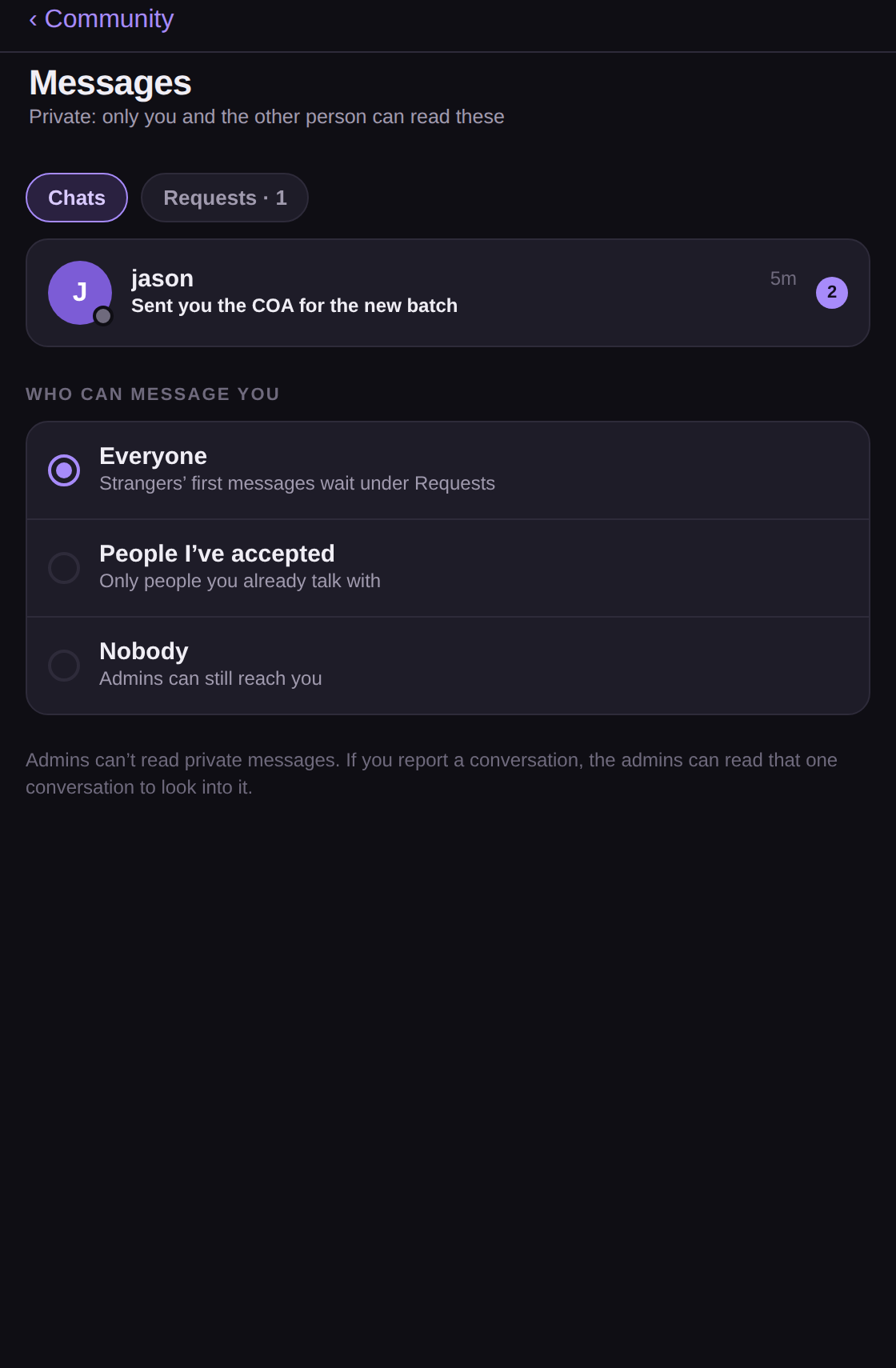
Community
Chat channels, forums with best answers and private messages, with people who track the same things. Report or block anyone in one tap. Your Peptivist records never show up there.
Open Community →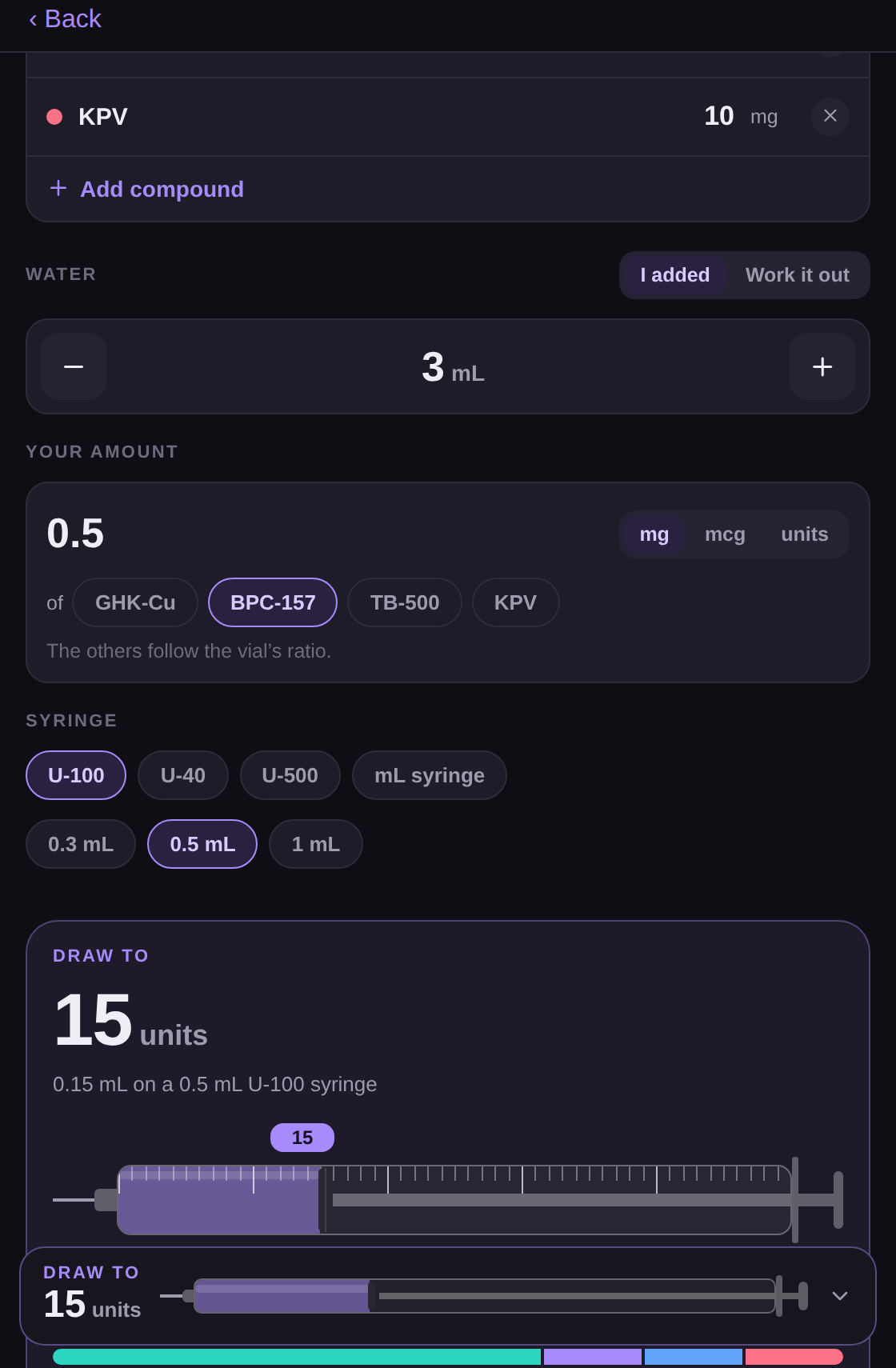
A calculator that shows its work
Water, draw and syringe units on one page, for a vial with one compound or several. A live answer with every step visible. It only does arithmetic on the numbers you type and never suggests an amount.
Open the calculator →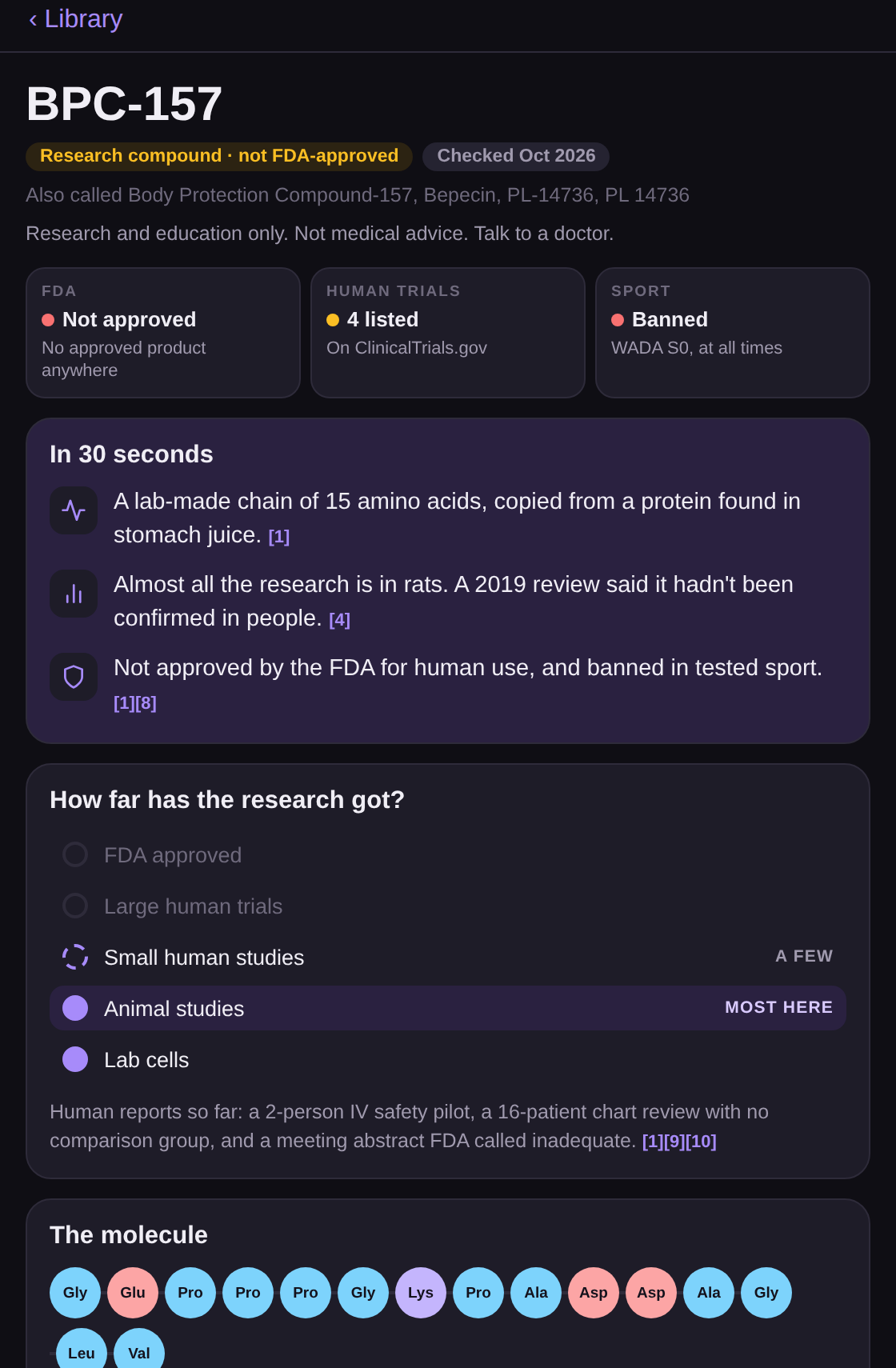
The Library
What FDA labels, PubMed and ClinicalTrials.gov actually say about common compounds, grouped by how much human research exists, with every fact linked to its source. Research and education only.
Open the Library →In the app
Everything you currently keep in a spreadsheet, a notes app and three alarms.
One place for what is due, what you have, what is on the way and what you have done — shown exactly the way you entered it.
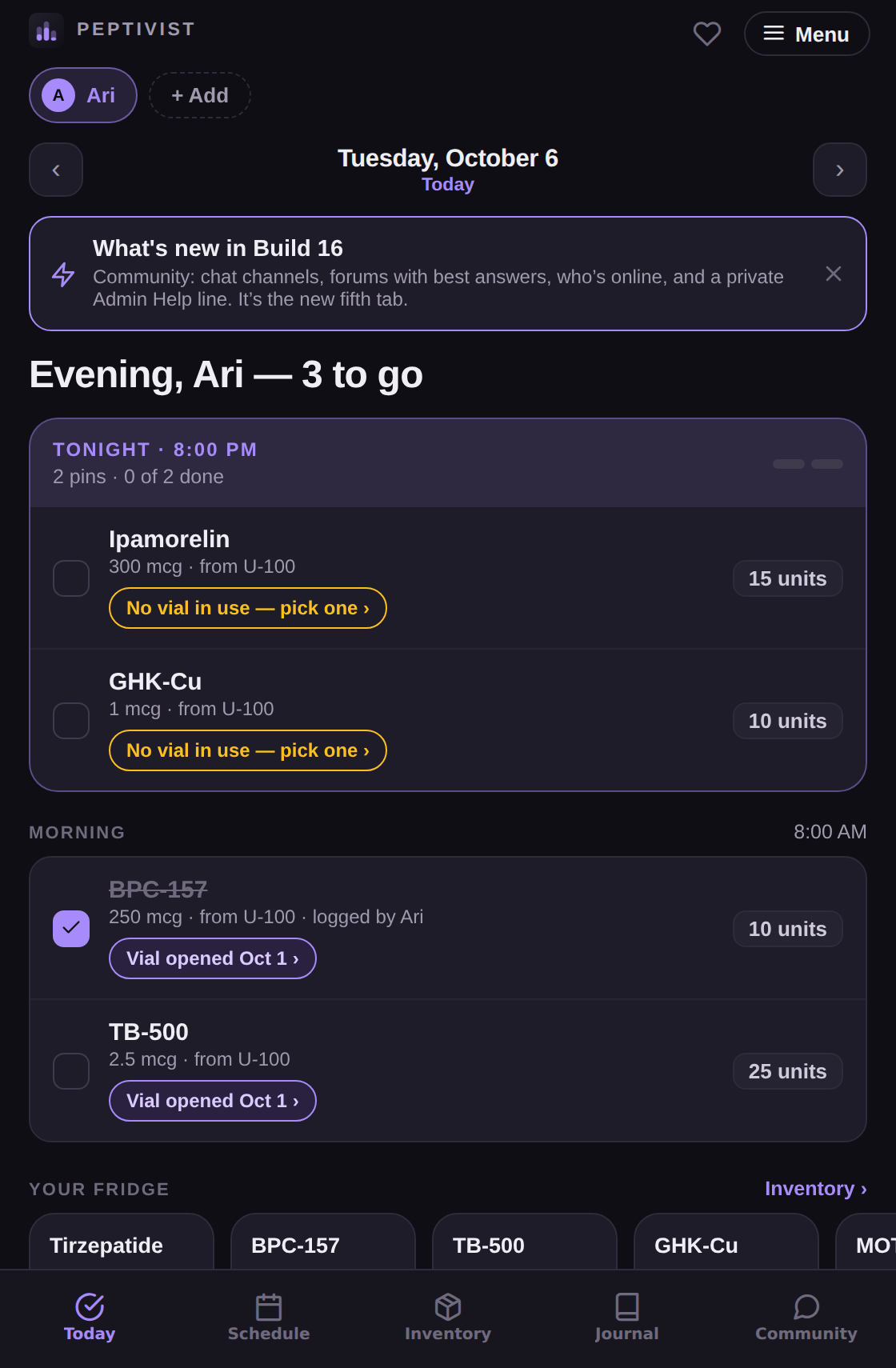
Today
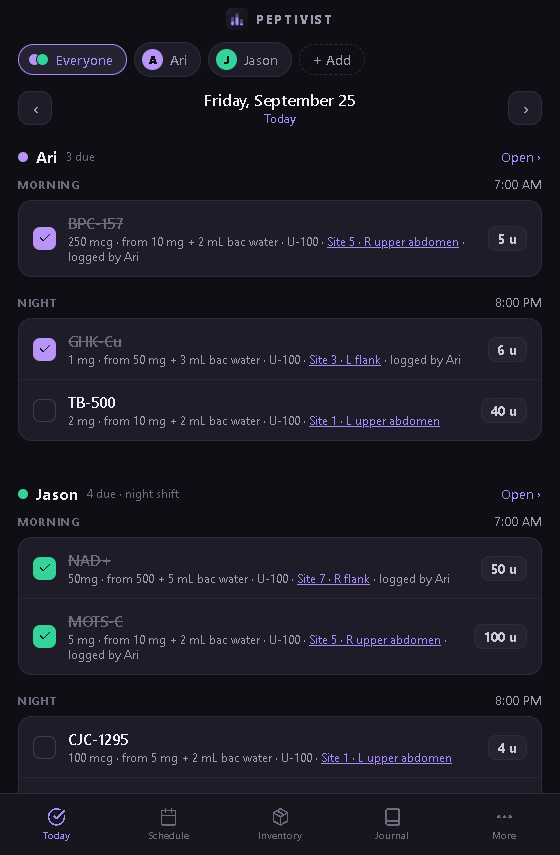
What is due this morning and tonight, in the order this person actually lives their day. Tick it off when it is done — and if your partner ticked it first, it says so.
Schedule, timeline, calendar
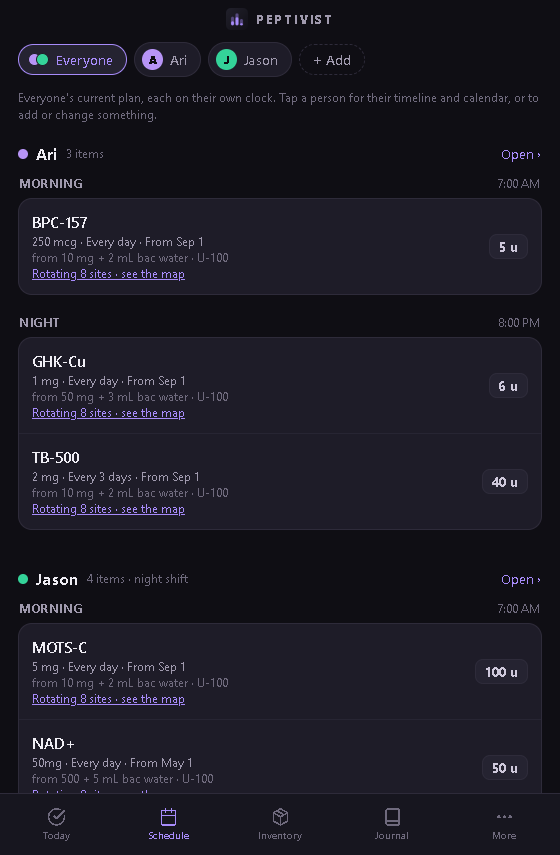
Every day, certain days, every few days, or a cycle with a last day. Doses that step up over time, written the way you typed them. A month view of what got done.
Inventory
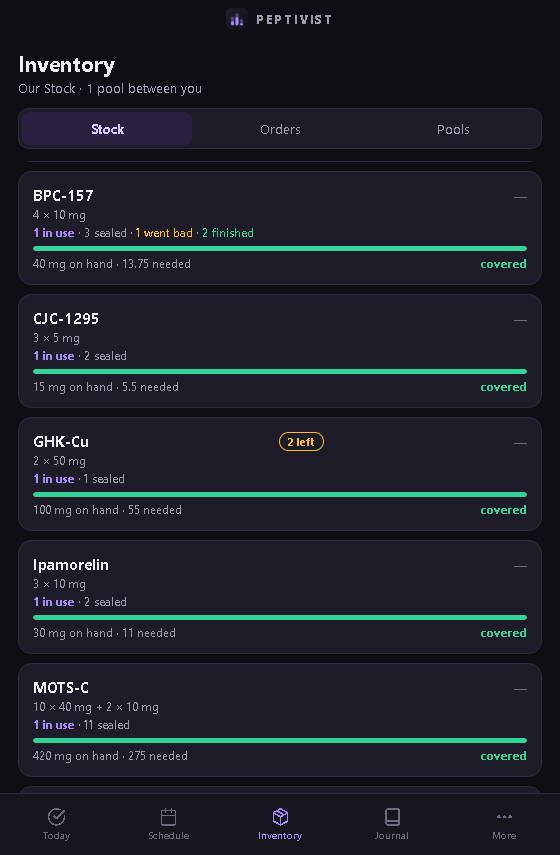
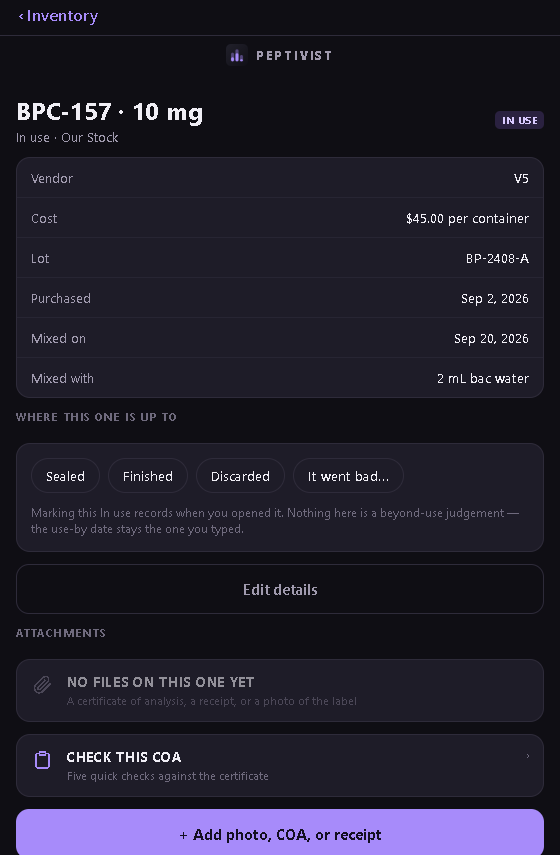
Vials, bottles and prescriptions — yours, or shared between two people. Sealed, in use, finished, went bad. Every dose shows which vial it came from.
Orders
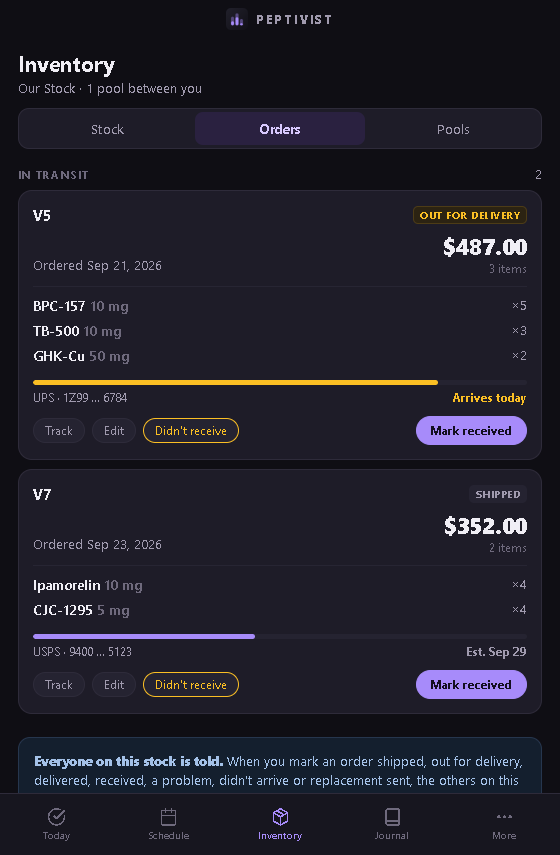
Carrier and tracking number, shipped to delivered, didn’t arrive, replacement sent. When the box lands, check what came, note anything wrong, and it goes straight into your inventory. Anyone who shares that stock gets the alert.
Journal
Weight, measurements, water, food, training, sleep, notes, lab results and progress photos — in whatever units you already use.
People and sharing
Keep a profile for a partner who has their own login, or a parent who will never install an app. Choose what each person can see — schedule, inventory, journal — and take it back any time, instantly.
Reminders that know when you are done
A nudge before each dose, snooze, and follow-ups until it is ticked. A reminder when a vial reaches the use-by date you set. On the lock screen it says only “Peptivist” unless you want more.
What Changed
A record of every edit to a profile — what changed, who changed it, when. Nobody can alter or delete it, including you. In an app two people share, that is a safety feature.
Calculator
Water, draw and syringe units on one page, for a vial with any number of compounds. A live answer with every step shown. Arithmetic only, on the numbers you type; it never suggests an amount.
Library
What public sources say about common compounds, grouped by how much human research there is, every fact linked. Approved before it is published, and never a recommendation.
Community
Channels, forums and private messages inside the app. Report or block in one tap; admins keep it civil. Separate from your records, which nobody in Community can see.
Import from another app
Export a CSV from your current tracker or spreadsheet and bring your protocols, vials and past check-offs with you. Your record picks up where it left off.
Pinning for two?
Your schedule and your partner’s, side by side.
Most trackers are built for one person. Peptivist keeps a separate profile for each person — a partner with their own login, a parent who will never install anything — each on their own daily rhythm, sharing the same stock.
- Everyone view. Both schedules on one screen, each in that person’s own order.
- Night shift. For someone who sleeps days, the app says Wake up and Before bed instead of Morning and Night, at the hours they actually keep.
- One shared stock. Both of you draw from the same vials. The app knows who paid, what is left, and who used the last of it.
- Who logged it. If your partner ticks a dose on their phone, yours shows it was them. No double entries.
- Take access back in one tap. It ends immediately. They are not asked, and they are not told.
The fridge
Know what you have, what is on the way, and which vial you are using.
- Vials, bottles, prescriptions. Sealed, in use, finished. Lot numbers, so if one vial from a batch went bad you can find the rest.
- Orders, start to finish. Tracking, didn’t arrive, replacement sent. When it lands, a quick check-in puts what came straight into your inventory.
- The life of a vial. Ran out? It offers the next one. Went bad? Note why, add a photo, and the app flags the rest of that lot.
- Use-by dates you set. Put a date on a vial and the app reminds you that morning. It never picks the date for you.
What it will never do
Peptivist never works out a dose for you. On purpose.
It keeps your records. It does not give advice. That rule shapes the whole app, and it is written into our terms, not buried in a footnote.
- No suggested doses. The calculator only does arithmetic on numbers you enter, and shows its work. Nothing in your records is worked out behind your back: every number is one you typed or saved.
- No tracking software. No analytics, no ad tracking, no crash reporting. None.
- Your photos are just photos. Never measured, scanned or analyzed. Location data is removed before upload.
- Export and delete are always free. From inside the app, on every plan. Your records are yours to take.
- No vendor lists, no affiliate links. We do not sell, recommend or get paid for anything you buy. Vendors you note are private to you.
Free and paid
Free for one person during the beta. Peptivist Together for two or more.
Join before November 20, 2026 and one person stays free for life. After launch, a new account picks Peptivist Solo ($3.99 a month or $29 a year) or Together ($7.99 a month or $59 a year), each with a 14-day free trial. Anything beyond that is just a way to say thanks.
Free
Everything, for one person. Yours for life if your account exists before November 20, 2026.
- Schedule, reminders, inventory, orders, journal
- Calculator, Library and Community
- Track as many items as you like
- Full change history
- Export or delete your data any time
Peptivist Together
or $39.99 a year. For you and up to 5 more people — a partner, parents, friends you look after.
- Each person gets their own schedule, journal and daily rhythm
- Share stock, and everyone hears when an order lands
- You choose what each person can see
- Billed by the App Store or Google Play; cancel there any time
Founding Member
Pay what you want to help keep Peptivist going. You already have every feature — this is support, with a few thank-you perks.
- Priority support — your emails are read first
- Early access to new features
- A Founding Member badge and the Gold color theme
- Your name in the credits, if you want it there
You can also leave a one-time tip, $2.99 to $99.99, just to say thanks. All of this is under Menu → Support Peptivist in the iPhone and Android apps. Apple and Google handle the payment; we never see your card.
Learn the basics
Short walkthroughs, built into the app.
Each one shows the real screen with the button you need circled, one step at a time. You will find them on the Today screen until you have something scheduled, and always under Menu.
Adding your first item
Open Schedule, tap Add, and fill in the name, the dose as you measure it, when, and how often. It appears on Today.
10 stepsAdding a vial to Inventory
Open Inventory, tap Add stock, and enter the compound, size, whether it is sealed or open, the lot number and the dates you choose.
8 stepsSharing a profile
Open Menu, then People, pick the person, choose what they can see, and take it back any time.
10 stepsCommon questions
Things people ask.
What is Peptivist?
An app for keeping track of peptides and anything else you take on a schedule — for you, and for the people you look after. It shows what is due, what you have, what you ordered, and what you have logged. It also has a calculator that shows its work, a Library of what public sources say, and a Community. It works in your browser today; the iPhone and Android apps are coming.
Is it free?
Yes, for one person — every feature, with no limit on how much you track. If you want to add a partner or family member, that is Peptivist Together, up to six people, with a 14-day free trial. Founding Member is optional: a way to support the app if you want to, not something you need.
Does it give dosing advice?
No, and it never will. The calculator only does arithmetic on numbers you type — what is in the vial, the water you added, the amount you chose, your syringe — and shows every step so you can check it. It has no presets and never suggests an amount. Every number in your records is one you typed. It keeps your records; it does not advise you.
Can I switch from another app?
Yes. Export a CSV from your current tracker or spreadsheet, open Menu → Import from another app, and bring your protocols, vials and past check-offs with you. Nothing is lost on the way, and you can export it all again from Peptivist any time.
What is in the Library?
Plain-English summaries of what FDA labels, PubMed and ClinicalTrials.gov say about common compounds, grouped by how much human research exists. Every fact links to its source, every entry is checked before it is published, and nothing in it is a recommendation. It is for research and education only. Browse the Library.
Is my data private?
Yes. There is no advertising or tracking software in the app at all. We never sell your data and never use health data for advertising. Your photos are stored as files and never analyzed. The only sharing is what you set up yourself, and you can take it back instantly. Privacy policy · Consumer health data.
Can my partner see everything?
Only what you choose. Schedule, inventory, journal, lab results and photos, and the change history are each a separate switch. Someone who can see your schedule and nothing else cannot see your bloodwork — that is enforced where the data lives, not just hidden on a screen.
Who makes it?
Opsgrip LLC, a small company in Nebraska. You can reach us at peptivistsupport@opsgrip.com, or through the support page.
 PEPTIVIST
Track your stack. And theirs. A health and fitness tracker for people who do this together.
Use it
- In your browser
- App Storecoming soon
- Google Playcoming soon